The oBot Empire module: what to build to grow the account, the next 30 steps with their payback time, energy and building rules, lifeforms and the build queue.
Last update: November 2, 2026
Empire module
In the bot panel, Account and bot group, the Empire card tells you what is worth building to grow the account and, if you want, queues it. The numbers come from the game's Empire page: real hourly production, energy, temperature, position and lifeforms of each planet. At the top a summary shows production per hour, the energy balance of each planet and how long ago the Empire page was read, with Refresh.
Switches
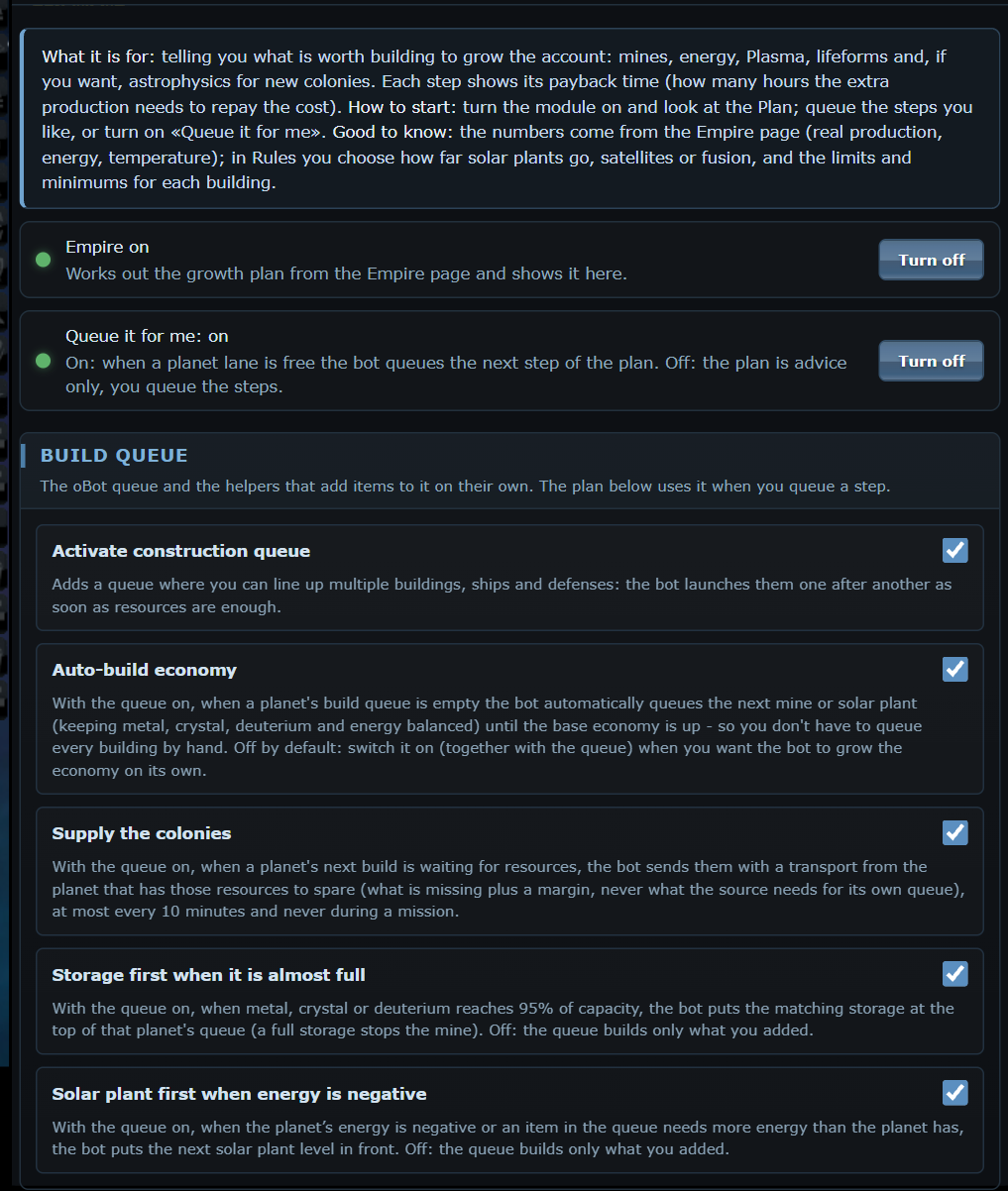
Empire on
Works out the growth plan and shows it in the card. When it is off, the bot calculates nothing.
Queue it for me (premium)
On: when a lane of a planet is free (buildings, lifeform buildings and research, research, shipyard) the bot queues the next step of the plan. Off: the plan is advice and you queue the steps with the + queue button. The items you queue yourself always come first.
Plan
The next 30 steps, sorted by payback time: how many hours the extra production needs to repay the cost. They include mines, energy (solar plant, satellites or fusion), Plasma technology with the research it requires, lifeform buildings and research that raise production and, if you turn it on, astrophysics for a new colony (advice only: you found the colony yourself). Before a step come the energy, storage or requirements it needs. Each row shows cost, extra production per hour, payback time, when it is reached (now if the resources are already there) and a lock to stop suggesting it. The chart at the top shows how much production grows along the plan. Without premium you see the first 3 steps.
Rules
Energy: solar plant up to the chosen level (0 = no limit), then solar satellites, fusion reactor or the cheapest.
Minimums and limits per building: the minimum brings the building at least to that level before anything else; the limit is never exceeded (0 = never). Empty = no limit.
What goes into the plan: mines, energy, Plasma, lifeform buildings and research, astrophysics and colonies.
Excluded planets and value of resources to compare metal, crystal and deuterium (empty = the server market ratios).
Locked steps from the lock button: one click unlocks them.
The profiles (Everything, Satellites, Fusion, Mines only, Colonies) fill in the form; the rules apply after Save rules.
Lifeforms
Planet by planet: species, population, food and the items that raise production, with the bonus per level and the payback time, or the reason they are out of the plan. For Rock'tal, Mechas and Kaelesh the real cost is read from the game, a few items at a time; until then the item waits.
Build queue
The bot's queue and the helpers that add items to it on their own live in this card. The plan uses it when you queue a step, by hand or with Queue it for me.
Activate construction queue (beta)
Adds a queue for buildings, research, ships, defences and Lifeform buildings and research, moons included. The bot starts them one after another as soon as resources are enough, using the real costs read from the game. Buildings, research and Lifeforms start from the Empire page, on any planet, without changing planet or page, new colonies included; the bot visits a planet only for ships and defences, or when the Empire page cannot be read. The queue has four lanes, one for each kind of work OGame can run at the same time: Buildings, Lifeform buildings, Lifeform research and Research. A row of tabs (badge, number of items and a status dot) picks the lane to show, remembered for each planet. At the top of each lane you see what OGame is really doing now (name, level, countdown), even if the bot did not start it; in progress appears only on the item the game is building, the others say waiting: lane busy with… or queued, and a free lane says so and leads to Packages. On the left the timers box says, for every planet and every lane, what is in progress or waiting, what is missing and how long until it is enough. The planet queue on the right scrolls inside its box when there are many items; it has arrows for the order inside the lane, an X to remove an item, the ✕ next to the planet name that clears the whole planet queue (after confirmation; whatever OGame is already building keeps going) and, on the items waiting for resources, the Transport resources button, which picks the planet that can spare them, shows you what leaves and with how many ships and sends the transport once you confirm. The X on a level also removes the higher levels of the same building, which cannot be built without it; the confirmation says how many. The Packages button on the Resources, Lifeforms, Research and Lifeform research pages offers ready-made packages: Resources (Planet start, Mines up to 25/22/20, Defences, Robotics and nanites, Research lab), Research (Expeditions, Economy, Fleet, Espionage and Combat, with their requirements) and Lifeforms (the buildings of your race: Base, Research, Population, Planet bonus; and the upgrade of the research chosen in the slots). The levels start from the real ones read on the page. A package already built, or all in the queue, turns grey with «Already done»; a half-done one says how many items are missing and adds only those. Each one asks for confirmation and is added at the end of the queue. Activities have an order: fleet save, transports and colony supply, expeditions, queue, anomalies, attacks. Without premium the queue works on all planets and moons, up to 3 items per planet; with premium there is no limit, with parallel lanes, colony supply, packages and automatic development.
The three options below add entries to the queue on their own. They are off by default: until you turn them on, the queue builds only what you added.
Storage first when it is almost full
With the queue on, when metal, crystal or deuterium reaches 95% of capacity, the bot puts the matching storage at the top of that planet's queue, because a full storage stops the mine.
Solar plant first when energy is negative
With the queue on, when the planet's energy is negative and the next build is a mine (or a building stopped by energy), the bot puts the next solar plant level in front.
Auto-build economy
With the queue on, when a planet's build queue is empty the bot queues the next mine or solar plant by itself, keeping metal, crystal, deuterium and energy balanced. It stops once the base economy is up. With the queue working from the Empire page it reads the levels there and starts the mine without visiting the planet, so a colony with an empty queue does not stay still (solar plant first when energy is negative, then crystal and deuterium behind metal, up to level 30). Premium. Off by default: turn it on yourself together with the queue.
Good to know
The plan is recalculated at every reading of the Empire page. Items the game refuses (requirements, population, required energy) stay out and do not hold the lane. With colony supply on, the plan counts the resources of all planets, otherwise those of the planet where it builds. After about ten steps the times are indicative.
 OGame