 Gladiatus
What oBot for Gladiatus is
oBot for Gladiatus is an assistant that runs inside the game tab, through the Tampermonkey extension. It attacks on expeditions as soon as you have a point and the cooldown is over, fights in the Provinciarum arena, heals you with the food in your bags when health is low, wears the best equipment, buys and sells weapons and armour, carries on your Pantheon quests and trains your stats. It waits for the game timers like a player would and never spends rubies.
Testing version
First steps
- Install Tampermonkey and the script. Install the Tampermonkey extension in Chrome or Firefox, then open https://js.obot.it/gladiatus/obot-gladiatus.user.js and press Install. Details are in the Installation section.
- Enter your Gladiatus server. The oBot button appears on the page: open it. The first time, the bot creates your oBot account by itself, with no sign-up, with a 3 day premium trial.
- Pick a profile. On the Home page, under Ready profiles, tap the profile marked recommended (or Automatic) and confirm: the bot sets Fights, Growth and Tasks together, saves and starts within a few seconds. See Ready profiles below.
- Fine-tune if needed. Open a page from the Home tiles, change the options and press Save. Every profile turns on automatic equipment (Growth page), which binds the items it wears to your soul: if you do not want that, switch it off there.
- Link Telegram (recommended) to know on your phone when you level up and when food runs out: see the Telegram section.
When things are saved
The panel
Home
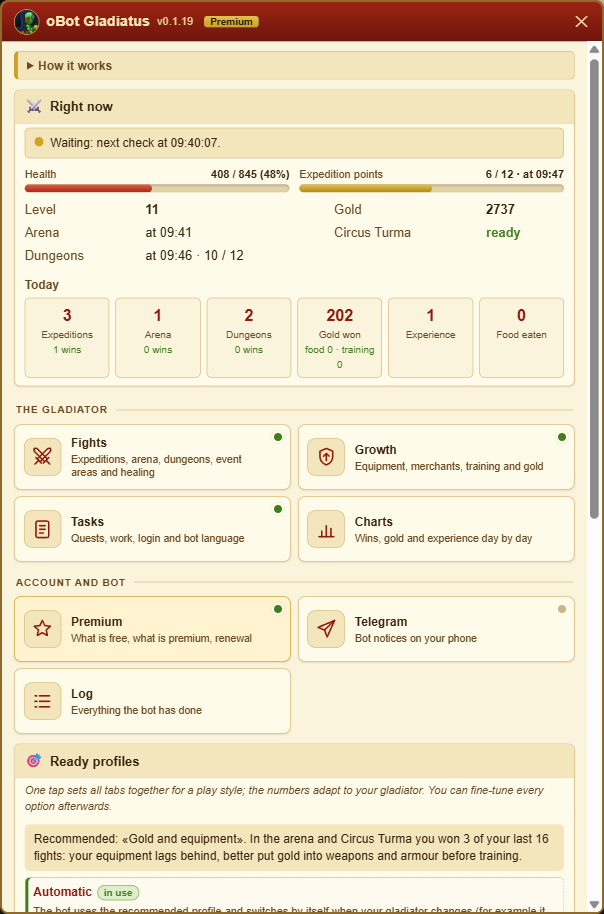
Fights
Growth
Tasks
Charts
Premium
Telegram
Log
Status bar
Version and news
Every tab opens with three lines: What it is for, How to start and Good to know. Under every option there is a line saying what it does; premium options carry the Premium tag.
Ready profiles
On the Home page, Ready profiles sets every option of Fights, Growth and Tasks in one tap for a style of play, with the numbers adapted to your gladiator. Telegram notices and automatic login stay as you set them; expedition location and enemy go back to Automatic. No profile uses rubies.
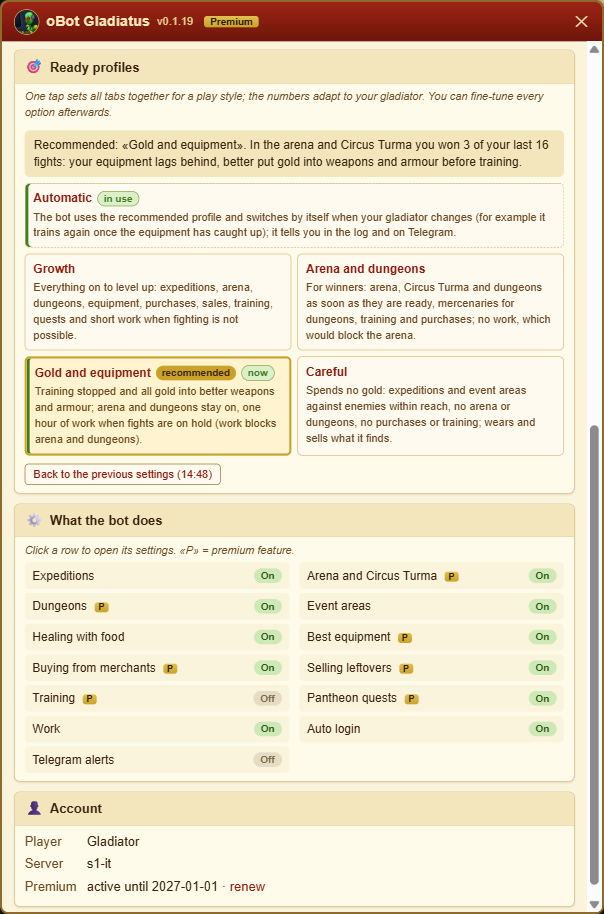
- Growth: everything on to level up (expeditions, arena, dungeons, equipment, purchases, sales, training, quests) and 1 hour work shifts when fighting is not possible.
- Arena and dungeons: for winners. Arena, Circus Turma and dungeons when they are ready, mercenaries for dungeons from level 10, training and purchases; no work, which would block the arena.
- Gold and equipment: training stopped and all gold into better weapons and armour; arena and dungeons stay on, 1 hour work shifts when fights are on hold.
- Careful: spends no gold. Expeditions and event areas against enemies within reach, no arena or dungeons, no purchases or training, 2 hour work shifts; it wears and sells what it finds.
- Automatic: uses the recommended profile and moves to another one when the recommendation changes and stays the same for two checks in a row (for example it trains again once the equipment has caught up); it says so in the log and on Telegram. If you change an option by hand, Automatic turns off and your choices stay.
The recommended mark also tells you why. Without premium it is Careful; up to level 9 it is Growth; if in the last 7 days you won less than 40% of your fights in the arena and the Circus Turma (out of at least 5) or lost all your dungeons (at least 3), it is Gold and equipment, because the equipment is behind; otherwise it is Arena and dungeons. The gold reserve adapts to your health: enough to buy the food for half your health, never less than 100 gold. If the profile in use is no longer the recommended one, the Home page says so and shows the button to switch.
You can go back
Charts
The Charts page, free for everyone, shows how your gladiator is doing day by day, over the last 7 or 30 days. There is nothing to set: the bot records the numbers while it works.
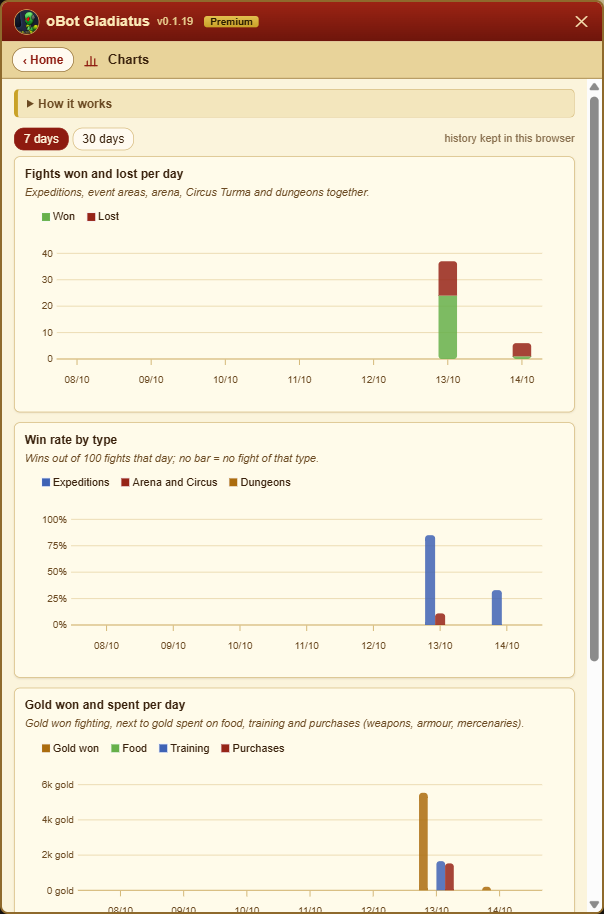
- Fights won and lost per day: expeditions, event areas, arena, Circus Turma and dungeons together.
- Win rate by type: expeditions, arena and Circus Turma, dungeons.
- Gold won by fighting, next to the gold spent on food, training and purchases.
- Experience gained per day; Show the numbers opens the table with the values and the level of each day.
- The history starts when version 0.1.19 is installed and stays in this browser for 60 days: another browser has its own charts. Since 0.1.22 the day-by-day numbers are also sent to the oBot server every half hour, so we can see how the bot works and fix it.
Bot language
The bot's panel, log and Telegram messages are in Italian or English. By default the bot uses the server language if it is one of the two, otherwise English; on the Tasks page, Bot language box, you can pick the other one (for example an English server with the bot in Italian). The choice is saved on the server; the game keeps its own language.
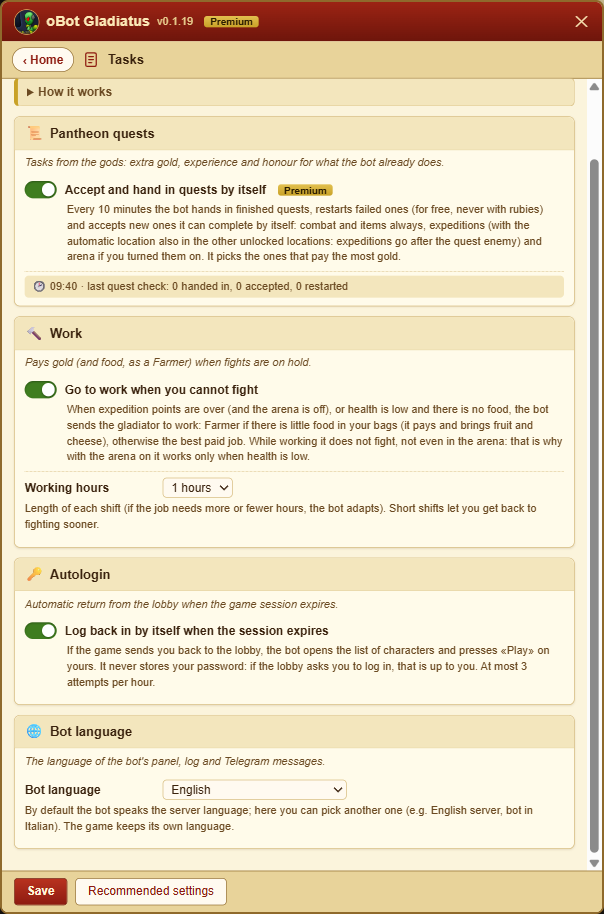
Recommended settings
At the bottom of Fights, Growth and Tasks the Recommended settings button fills in that page with the values of the profile recommended for your gladiator, without saving: check them and press Save. It is handy to fix a single page without touching the others. The values adapt to the gladiator:
- the gold reserve, worked out from your health (never less than 100 gold);
- mercenaries for dungeons, only from level 10;
- work and its hours, as in the profile;
- expedition location and enemy on Automatic.
Free and premium
Free
- Automatic expeditions, with the enemy picked by itself
- Event areas, with the points the game refills every night
- Healing with the food in your bags and careful fights
- Food collected from packages
- Work when you cannot fight
- Autologin when the session expires
- Telegram notices and link, log
- Charts and bot language
- Game mail reading
Premium
- Provinciarum arena and Circus Turma
- Dungeons
- Best equipment worn by itself
- Purchases in the shops and sales to the merchant
- Pantheon quests
- Stat training
- Bonus potions and food bought when needed
- Mercenaries for dungeons
Premium is for your oBot Gladiatus account (OGame and Ikariam have their own); packages and prices are the same for every oBot bot. Every new account gets a 3 day trial with everything on. Without premium the premium options are saved anyway and the panel reminds you with the renewal link: they start as soon as premium is active. Details in the Premium section. You can also get premium for free: see Free premium in the Premium section.
How it works
- The bot works only with a game tab open, even in the background. With the browser closed, the PC asleep or the tab suspended by Chrome nothing happens: see the FAQ The bot stopped for hours.
- With several tabs open only one works, the «leader tab»: the others wait, so the same attack never starts twice. If you close or reload the leader tab, another one takes its place.
- Requests go out one at a time and only when the page is idle; between two fights the bot waits for the game timers plus a few random seconds.
- The bot never spends rubies: expeditions without rubies, purchases with gold only, quests restarted only when it is free.
- Settings are stored on the oBot server, tied to your game account: they survive a reinstall and work from another PC.
- The panel, log and Telegram messages are in Italian or English: the server language by default, or the one chosen under Bot language.
- Updates arrive by themselves through Tampermonkey; before running new code the bot checks its fingerprint.